Pentest Workflow Settings
In this article we will talk about Pentest Workflow Settings.
Pentest Workflow Settings are use to manage the lifecycle of the Pentest Workflow, and provide to our scheduling system the behaviours that it should use for specific states.
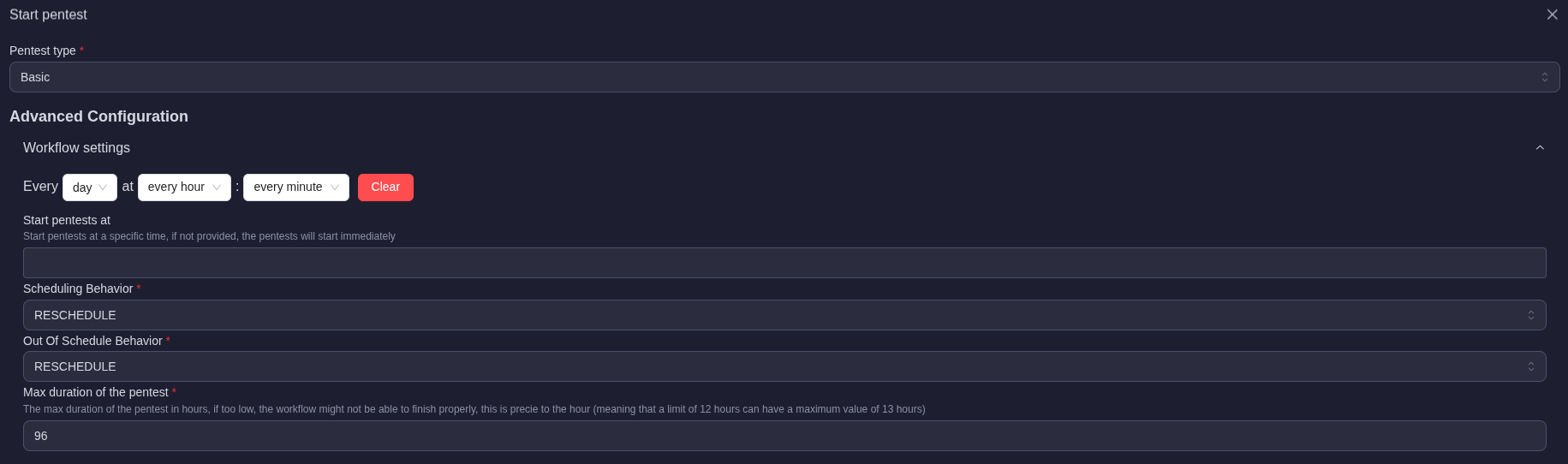
Scheduler
Pentests runs are managed by a centralized Scheduler.
Each pentest has its own allocated resources, and own job executions workflow.
The scheduler has a max duration precision of +/- 1h (meaning that, if you set a maximum runtime of 96 hours, the maximum duration can be exceeded by 1 hour (97hours)).
The scheduler has a overdue percision of 30 minutes, meaning that pentests are marked as overdue if they are more than 30 minutes late.
The number of parallel pentests runned at the same time has an impact on when they are runned, the scheduler will always prioritze the pentests that have not been runned for a long time.
As an example, if there are 100 pentests scheduled monday at 00:00, and your capacity (see Settings > Organization) for parallel pentests is 10, then 10 parallel pentests will be launched.
The scheduler will always try to match the maximum amount of parallel jobs configured, meaning that it will never be superior to the maximum number of parallel pentests configured.
Scheduler available options
Here's a list of all the available options, and their impact, on the scheduler:
- Scheduler run behaviour:
IMPORTANT NOTE: THE SCHEDULER RUN BEHAVIOR OPTION USES UTC.
this is the first setting you have access to, it allows you to manage when your scheduler should be triggered.

It works similarly to a Crontab, you schedule the repeatability of your workflow here, when it should run.
Note that the option only managed the start of the workflow, it will not have an impact on when it ends (see other options for that).
If the scheduler is untouched (or cleared), its default value is a run every week during the week-day that you launched the pentest on (as an example: if I run my pentest a Monday, and dont set the scheduler, it will be set to every Monday, at 00:00 UTC).
-
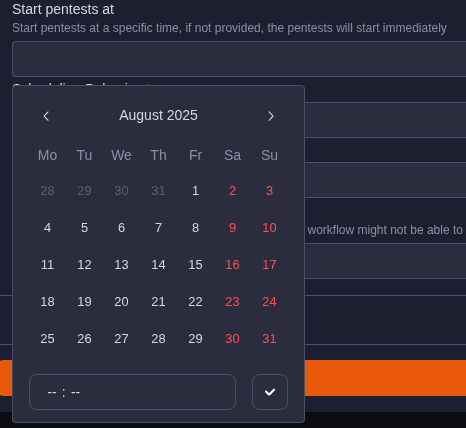
Start pentest at:
Self explanatory, defines when the pentest should start, if kept empty, it will start now (if max parallel pentests is not currently reached)
-
Scheduling behavior:
How the scheduler should behave when the pentest is ready to be started
This option allows you to define how the scheduler should react if the workflow is already running because of an older run.
As an example, let's have a configured Pentest that runs every days at 00:00, the next day at 00:00, if my last pentest is still running, the scheduler will use the Scheduling behavior that you have configured here to define its actions.
There are 3 available options:-
RESCHEDULE:
This option will not interrupt the current running pentest, and reschedule the one that should have been executed to the next iteration
-
KILL_LAST_RUN:
This option will interrupt the current running pentest, and run a new one from the begenning
-
WIAT_FOR_LAST_RUN:
This option will wait for the last run to finish before executing your new iteration of the pentest. WARNING: The scheduler runtime WILL BE BYPASSED, that means that the pentest can run at any moment after the older one is done.

-
-
Out of schedule behavior:
How the scheduler should behave when the pentest start date limit has been reached.
A pentest is considered out of schedule if its runtime date has been passed by 30 minutes, if it is the case, the scheduler will define its behavior using this options. There are 2 available options:-
RESCHEDULE:
This option will reschedule the pentest for the next iteration depending on its run schedule configuration.
-
STILL_RUN:
This option will allow the scheduler to still run the pentest, even if it is overdue. WARNING: The scheduler runetime WILL BE BYPASSED, that means that the pentest can run at any moment depending on the maximum pentests runnable slots avaiable.

-
-
Max duration of the pentest:
tipAs a rule of thumb, we recommend 96 hours for Advanced and Essential pentests, and 12 hours for Basic pentests.
The maximum duration that you want to allow the pentest to run for. IMPORTANT NOTE: It is important to allow for a long duration for the pentests to provide their best results. The lower this value, the less results we will be able to scan, long pentests are generally more reliable.
After this duration, the pentest will be killed, and will not provide any further results.
It is important to correlate your max pentest duration and your parallel pentests so you set the correct values to be able to run your pentests properly.
As an example, having 100 pentests active, with 96 hours, would mean that you will need at least 57 parallel pentests to be able to run them all in a single week.
noteDo not forget that this is the maximum time for a pentest to run. Meaning that, if the pentest is faster, it will release its slot for another pentests on the scheduler.
